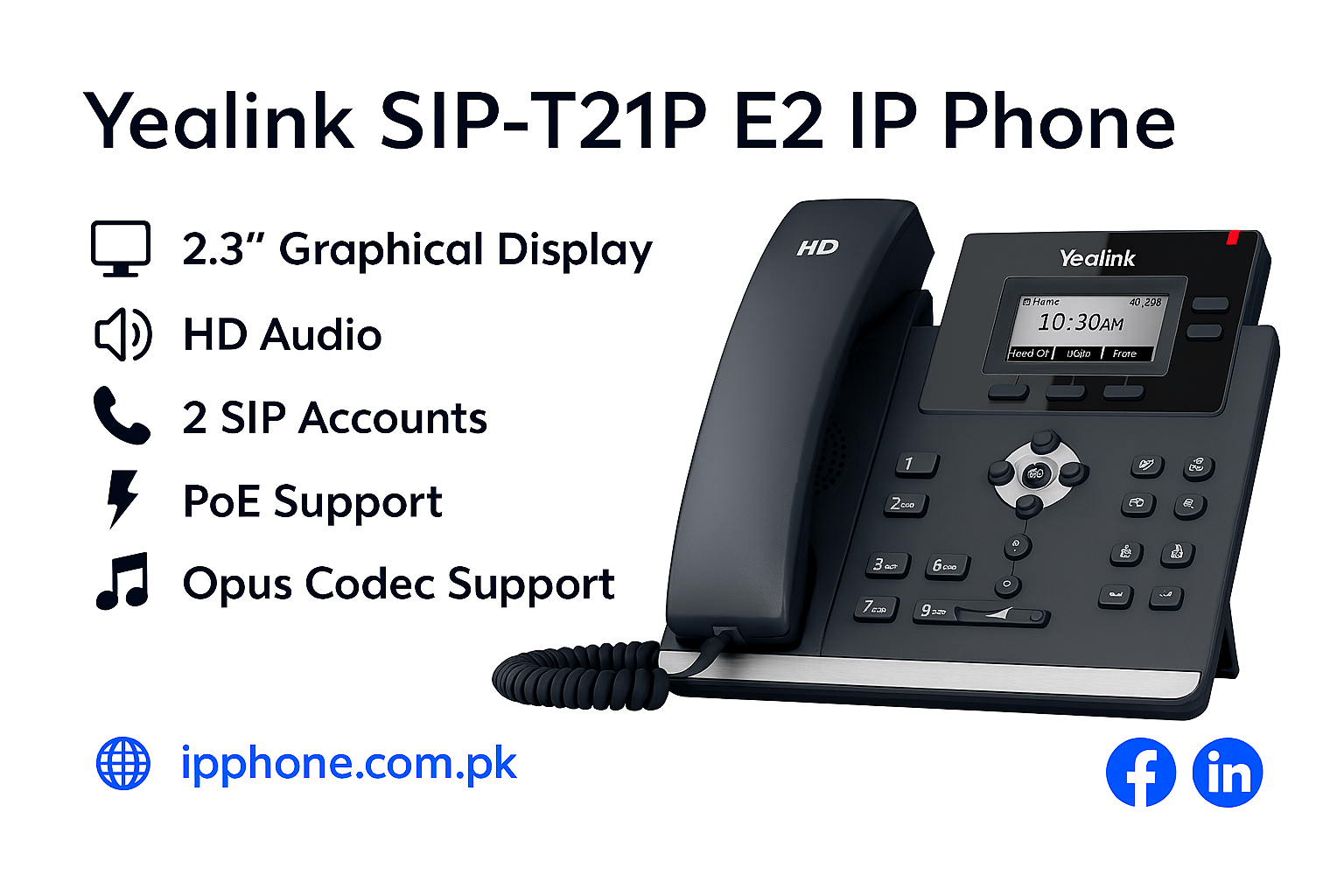
Yealink SIP T21P E2 Price in Pakistan
Yealink SIP T21P E2 – Key Features
-
2.3″ graphical LCD display for clear call info
-
Supports 2 SIP accounts for dual-line use
-
Power over Ethernet (PoE) for easy setup
-
HD voice quality with full-duplex speakerphone
-
Dual 10/100 Mbps Ethernet ports
-
Simple, user-friendly interface ideal for all staff
Description
Yealink SIP T21P E2 IP Phone Price in Pakistan – Reliable Entry-Level Business Phone Solution
Looking for the latest
Yealink SIP T21P E2 IP Phone price in Pakistan for your office communication setup? The Yealink SIP-T21P E2 IP Phone is a reliable and affordable communication solution designed for businesses that need a professional voice IP phone without high deployment costs. Built for startups, offices, reception desks, and small organizations, this device delivers excellent call quality and practical functionality for modern business communication.
Businesses planning to Buy Yealink SIP-T21P E2 IP Phone often choose this model because it offers a perfect combination of affordability, performance, and simple deployment.
Browse more communication solutions:
Why Buy Yealink SIP-T21P E2 IP Phone for Office Communication?
Business communication systems should be simple, efficient, and reliable. The Yealink SIP-T21P E2 is specifically designed to provide professional communication features while remaining budget friendly.
Key advantages include:
✓ HD voice technology
✓ Support for 2 SIP accounts
✓ Dual Ethernet ports
✓ PoE support
✓ Noise reduction features
✓ Secure communication protocols
✓ Easy provisioning support
✓ User-friendly interface
The SIP-T21P E2 supports two VoIP accounts, dual Ethernet ports, integrated PoE support, and secure protocols including TLS and SRTP.
Need an Affordable SIP Phone for Daily Office Use?
The Yealink SIP-T21P E2 IP Phone works as an efficient communication device for businesses using IP phone systems and voice over IP phone systems.
Supported functions include:
- HD voice calling
- Call forwarding
- Call transfer
- Call hold
- Speed dialing
- Voicemail support
- Call waiting
- Three-way conferencing
- BLF support
- Extension management
These communication functions improve daily workflow and help teams remain productive.
How Does Yealink SIP-T21P E2 Improve Communication Quality?
Better Voice Performance for Professional Conversations
Poor call quality can affect customer service and internal collaboration.
The Yealink SIP-T21P E2 provides:
- Yealink HD Voice technology
- Echo cancellation
- Full-duplex speakerphone
- Wideband codec support
- Adaptive jitter buffering
- Background noise reduction
Yealink integrates HD voice and audio enhancement technologies to create clearer and more natural conversations.
Whether you manage customer inquiries or daily internal communication, this voice over IP phone helps maintain professional communication standards.
Looking for the Best IP Phone for Small Businesses?
Many organizations compare best IP phone, desk telephone, SIP IP phone, and business IP phone service options before purchasing.
The Yealink SIP-T21P E2 delivers value through:
Business Benefits
✓ Lower communication expenses
✓ Simple deployment
✓ Professional voice quality
✓ Secure network communication
✓ Better team collaboration
✓ Easy management
Businesses upgrading from traditional desk telephones often experience improved efficiency and reduced communication costs.
Why Choose Yealink Phones Instead of Traditional Office Phones?
Traditional communication systems often limit flexibility and create higher maintenance costs.
The Yealink SIP-T21P E2 helps businesses through:
- Easier call management
- Better extension control
- Reduced infrastructure costs
- Secure communication
- Flexible deployment
- Better scalability
Businesses frequently choose Yealink phones because they provide modern VoIP functionality while remaining easy to manage and cost-effective.
Need installation support?
Compatible with Modern Business Communication Systems
The Yealink SIP-T21P E2 integrates smoothly with:
- SIP platforms
- Hosted VoIP systems
- Unified communication platforms
- Business phone services
- IP PBX environments
The phone supports IPv6, OpenVPN, and secure provisioning mechanisms for business communication environments.
Explore additional communication systems:
Common Business Use Cases of Yealink SIP-T21P E2 IP Phone
The Yealink SIP-T21P E2 is commonly used for:
- Small businesses
- Reception desks
- Customer service teams
- Educational institutes
- Healthcare facilities
- Office environments
- Retail businesses
- Startup organizations
Frequently Asked Questions About Yealink SIP-T21P E2 IP Phone
What is Yealink SIP-T21P E2 IP Phone used for?
The Yealink SIP-T21P E2 is used for professional VoIP communication, extension handling, and office call management.
How many SIP accounts does Yealink SIP-T21P E2 support?
The device supports up to two SIP accounts.
Does Yealink SIP-T21P E2 support PoE?
Yes, it supports integrated Power over Ethernet for simpler installation.
Is Yealink SIP-T21P E2 suitable for small businesses?
Yes. It is designed specifically for startups and businesses looking for affordable communication systems.
Why should businesses Buy Yealink SIP-T21P E2 IP Phone?
Businesses select this model because it provides reliable HD voice quality, easy deployment, and professional communication features at an affordable price.
Buy Yealink SIP-T21P E2 IP Phone Price in Pakistan Today
If you are searching for the best voice over IP phones, comparing Yealink IP phones, or planning to Buy Yealink SIP-T21P E2 IP Phone, this model offers reliable business communication with excellent value.
Upgrade your office communication with a secure, affordable, and business-ready IP phone solution.
Additional information
| Voice | HD voice |
|---|---|
| Display | 2.3-inch monochrome LCD with backlight |
| Connectivity | Dual 10/100 Ethernet ports |
| Audio | Optima HD voice technology |
| SIP Accounts | Supports up to 2 SIP accounts |
| User Interface | Intuitive interface with hard keys |
| Codec | Opus codec support |
| Power | Power over Ethernet (PoE) |
| Headset Support | RJ9 headset port |
| Network Features | IPv6 support, SRTP/HTTPS/TLS, VLAN QoS |

Reviews
There are no reviews yet.