Cloud PBX
Cloud PBX Providers in Lahore
A cloud PBX runs your business phone system in a data centre instead of a box in your office. Staff get extensions, an auto attendant and call routing on desk phones, laptops and mobiles — wherever they work.
- No PBX hardware to buy or maintain
- Branches and home workers on one system
- Add users as you grow
Cloud PBX in Pakistan, set up and supported from Lahore
A cloud PBX gives your business a complete phone system without a PBX box in the office. Extensions, the auto attendant, ring groups and call routing run in a data centre, and your staff connect from IP phones, laptops and mobile apps over the internet. It suits companies with more than one branch, teams that work from home, and businesses that want to grow without buying new hardware.
What a cloud PBX includes
- Extensions for every user, with direct numbers where needed (DID & virtual numbers).
- An IVR / auto attendant that greets callers and routes them by department.
- Ring groups, call queues, time-based rules and voicemail to email.
- Mobile and desktop softphones, so staff can answer office calls anywhere.
- Call recording and call reports where your plan supports them.
How we set it up
We start with your users, branches and existing numbers, then plan the extensions, IVR script and call flow. Our engineers configure the system, provision the phones and apps, connect your SIP trunks and test every route before handover. After go-live our team provides 24/7 technical support for changes and faults.
Cloud PBX or on-site IP PBX?
Choose a cloud PBX when you have several locations or remote staff and do not want to maintain hardware. Choose an on-site IP PBX when you prefer equipment in your office or need to connect many existing analog lines through FXO ports. Not sure? Tell us how your team works and we will recommend one.
What we cover
Cloud PBX services in detail
Extensions & call routing
An extension for every user, ring groups and time-based rules so calls reach the right team.
IVR & auto attendant
A recorded menu greets callers and sends them to sales, support or accounts.
Mobile & desktop softphones
Staff answer office calls on a smartphone app or laptop softphone, on their own extension.
Remote & multi-branch
Branches and home workers share one phone system, with internal calls between extensions.
Call recording
Recording where your plan supports it, with access limited by user role.
Security & reliability
Strong SIP passwords, restricted admin access and a fallback route for inbound calls.
Who it's for
Where Cloud PBX fits
- Multi-branch businessesOne numbering plan and free internal calling between offices.
- Remote and hybrid teamsStaff keep their extension at home or on the move.
- Growing companiesStart with a few users and add more without new hardware.
- Customer support desksIVR, ring groups and queues so no caller is left ringing.
How we work
From first call to support
- 01
Tell us what you need
Users, branches, numbers and the phones you have. A short call or WhatsApp chat is enough.
- 02
Get a clear plan
We recommend the Cloud PBX setup, list the hardware and explain the costs before work starts.
- 03
Installation & configuration
Our engineers install, configure and test every extension, route and device.
- 04
Handover & 24/7 support
You get a short handover and a team to call for changes or faults, any time.
Related products
Hardware for Cloud PBX
-
All ProductsOrder on WhatsApp
Fanvil Linkvil W610W Price in Pakistan | WiFi IP Phone
Original price was: ₨ 69,960.₨ 57,960Current price is: ₨ 57,960. Add to cart -
All ProductsOrder on WhatsApp
Fanvil X6U IP Phone Price in Pakistan | Premium SIP Business Phone
Original price was: ₨ 85,240.₨ 72,240Current price is: ₨ 72,240. Add to cart -
All ProductsOrder on WhatsApp
Fanvil X301W IP Phone Price in Pakistan | Wi-Fi SIP Phone
Original price was: ₨ 25,825.₨ 20,825Current price is: ₨ 20,825. Add to cart -
All ProductsOrder on WhatsApp
Fanvil V67 IP Phone Price in Pakistan | Premium SIP Video Phone
Original price was: ₨ 176,330.₨ 156,330Current price is: ₨ 156,330. Add to cart

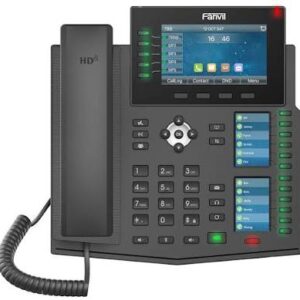
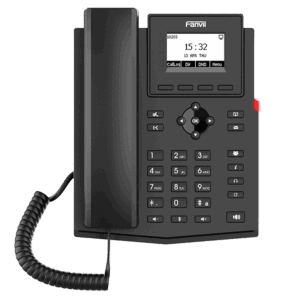
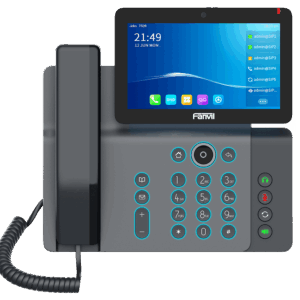
Browse: IP Phones · Audio & Video Conferencing
FAQ
Questions about Cloud PBX
Can I use my existing IP phones with a cloud PBX?
Most standard SIP phones work with a cloud PBX. Send us the model numbers and we will confirm compatibility and provisioning.
Can employees use the cloud PBX from home?
Yes. Staff can use a softphone app on a mobile or laptop, or an IP phone at home, with their normal office extension.
Is a cloud PBX suitable for multiple branches?
Yes. All branches share one system and one numbering plan, so internal calls between offices are extension-to-extension.
What internet connection do I need?
A stable broadband or fibre connection. We check bandwidth, router settings and QoS before go-live so calls stay clear.
PBX advisor
Not sure which IP PBX suits you?
Answer three questions for an instant suggestion, then check which phone brands work with each PBX. An engineer can confirm the exact model on WhatsApp.
Which phones work with which PBX?
| Phone brand | Yeastar P-Series | Grandstream UCM | 3CX | Asterisk / FreePBX |
|---|---|---|---|---|
| Yealink | Auto-provisioning | Auto-provisioning | Auto-provisioning | Standard SIP (manual setup) |
| Fanvil | Auto-provisioning | Standard SIP (manual setup) | Auto-provisioning | Standard SIP (manual setup) |
| Grandstream | Auto-provisioning | Auto-provisioning | Some models | Standard SIP (manual setup) |
| Cisco* | Auto-provisioning | Some models | Not supported / legacy | Standard SIP (manual setup) |
| Poly / Polycom | Auto-provisioning | Some models | Some models | Standard SIP (manual setup) |
| Huawei | Standard SIP (manual setup) | Standard SIP (manual setup) | Standard SIP (manual setup) | Standard SIP (manual setup) |
- Auto-provisioning
- Some models
- Standard SIP (manual setup)
- Not supported / legacy
* Cisco phones need multiplatform (3PCC) firmware to register on a non-Cisco PBX. Support depends on model and firmware — based on Yeastar, Grandstream and 3CX compatibility lists. We confirm compatibility before you order.
Related services
Often combined with Cloud PBX
Software IP PBX
On-premise or virtual PBX software with SIP trunks, queues and voicemail.
Learn moreIP PBX
IP PBX installation and configuration for single and multi-site offices.
Learn moreVoIP & SIP Services
SIP trunk setup, NAT and firewall tuning, and call-quality troubleshooting.
Learn moreDID & Virtual Number
Direct inbound numbers routed to your PBX, branches or mobile users.
Learn more