Software IP PBX
Software PBX Phone System for Modern Businesses
A software PBX is a complete business phone system that runs on a server — in your office or in the cloud — instead of dedicated PBX hardware. You get extensions, IVR, queues and voicemail, with full control of the configuration.
- Runs on your server or in the cloud
- Works with the SIP phones you have
- Full control of features and data
Software PBX phone systems for businesses in Pakistan
A software PBX is a full business phone system that runs as software on a server — in your office, on a virtual machine or in a data centre. You get extensions, IVR, call queues, ring groups, voicemail and call recording, with full control over configuration and data. It is a strong choice for companies with in-house IT, call centres, and businesses replacing an older PBX.
Platforms we work with
We deploy and configure Asterisk-based systems such as FreePBX, as well as 3CX and Yeastar, and recommend a platform based on your number of users, features and budget. Each option is explained with its trade-offs before you decide.
What is included
- Server sizing and installation, on-premise or in the cloud.
- SIP trunk and DID number integration with inbound and outbound routes.
- IVR, queues, ring groups, voicemail-to-email and time conditions.
- Provisioning of SIP phones from Yealink, Grandstream, Fanvil and other brands.
- Secure remote extensions for staff working outside the office.
- Migration from an analog or older IP PBX, with FXO gateways for lines you keep.
Support after installation
Once the system is live, our team handles changes such as new extensions, IVR updates and routing rules, and provides 24/7 technical support for faults.
What we cover
Software IP PBX services in detail
Platform selection
Asterisk, FreePBX, 3CX or Yeastar — chosen on users, features and budget, with the trade-offs explained.
On-premise or cloud
Install on your own server or virtual machine, or host it in a data centre.
SIP trunk integration
Your provider's SIP trunks and DID numbers connected, with inbound and outbound routes.
IVR, queues & voicemail
Auto attendant, call queues, ring groups and voicemail-to-email.
Phones & remote access
Provisioning for SIP phones from Yealink, Grandstream, Fanvil and others, plus secured softphones.
Migration & installation
Extensions, numbers and routes moved from an older PBX with a planned cut-over.
Who it's for
Where Software IP PBX fits
- Companies with in-house ITKeep the PBX on your own infrastructure and manage it yourself.
- Call centresQueues, recordings and reports on a platform you control.
- Replacing an old PBXMove from an analog or end-of-life system without changing how people work.
- Strict data policiesCall data stays on servers you own.
How we work
From first call to support
- 01
Tell us what you need
Users, branches, numbers and the phones you have. A short call or WhatsApp chat is enough.
- 02
Get a clear plan
We recommend the Software IP PBX setup, list the hardware and explain the costs before work starts.
- 03
Installation & configuration
Our engineers install, configure and test every extension, route and device.
- 04
Handover & 24/7 support
You get a short handover and a team to call for changes or faults, any time.
Related products
Hardware for Software IP PBX
-
All ProductsOrder on WhatsApp
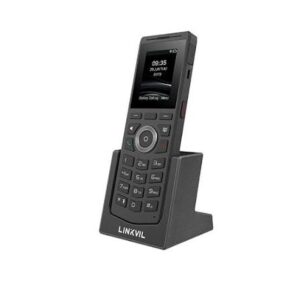
Fanvil Linkvil W610W Price in Pakistan | WiFi IP Phone
Original price was: ₨ 69,960.₨ 57,960Current price is: ₨ 57,960. Add to cart -
All ProductsOrder on WhatsApp
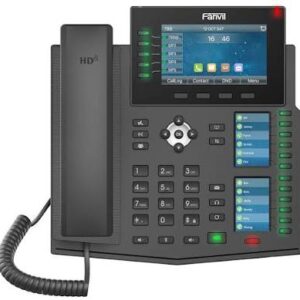
Fanvil X6U IP Phone Price in Pakistan | Premium SIP Business Phone
Original price was: ₨ 85,240.₨ 72,240Current price is: ₨ 72,240. Add to cart -
All ProductsOrder on WhatsApp
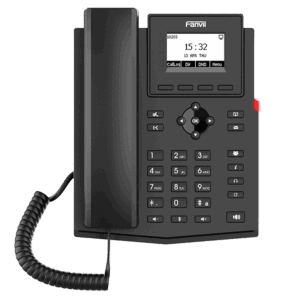
Fanvil X301W IP Phone Price in Pakistan | Wi-Fi SIP Phone
Original price was: ₨ 25,825.₨ 20,825Current price is: ₨ 20,825. Add to cart -
All ProductsOrder on WhatsApp
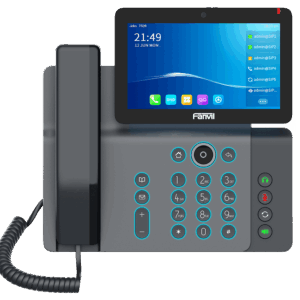
Fanvil V67 IP Phone Price in Pakistan | Premium SIP Video Phone
Original price was: ₨ 176,330.₨ 156,330Current price is: ₨ 156,330. Add to cart
Browse: IP Phones · FXO Gateways
FAQ
Questions about Software IP PBX
What is a software PBX?
A software PBX is a business phone system that runs as software on a server instead of a dedicated PBX appliance. It provides extensions, IVR, queues and voicemail.
How is a software PBX different from a hardware PBX?
A hardware PBX is an appliance with built-in ports. A software PBX runs on a server you choose and connects to lines through SIP trunks or gateways, which makes it flexible to scale.
Can I keep my existing phone numbers?
Usually yes. Existing analog lines can connect through FXO gateways, and many numbers can be moved to SIP. We check your lines before migration.
Is a software PBX suitable for a call centre?
Yes. Queues, recording, reports and agent extensions are standard features, and dialers can be added where needed.
Software PBX
Yeastar P-Series Software Edition
A complete business phone system that runs as software — on your own server, a virtual machine or a private cloud. We install, configure and support it for offices, call centres and multi-branch companies across Pakistan.
- Your server, VM or private cloudInstall on your own hardware or a virtual machine — your call data stays with you.
- Scales to 10,000 usersStart small and add users, branches and concurrent calls as you grow.
- Linkus softphone appsTake office calls on mobile, desktop and web — ideal for remote staff.
- Contact-centre featuresQueues, IVR, call recording, wallboards and reports for busy teams.
- Auto-provisions your phonesYealink, Fanvil, Grandstream, Cisco, Poly and more — plug in and go.
- Voice, video & messagingCalls, video meetings and chat on one unified platform.
PBX advisor
Not sure which IP PBX suits you?
Answer three questions for an instant suggestion, then check which phone brands work with each PBX. An engineer can confirm the exact model on WhatsApp.
Which phones work with which PBX?
| Phone brand | Yeastar P-Series | Grandstream UCM | 3CX | Asterisk / FreePBX |
|---|---|---|---|---|
| Yealink | Auto-provisioning | Auto-provisioning | Auto-provisioning | Standard SIP (manual setup) |
| Fanvil | Auto-provisioning | Standard SIP (manual setup) | Auto-provisioning | Standard SIP (manual setup) |
| Grandstream | Auto-provisioning | Auto-provisioning | Some models | Standard SIP (manual setup) |
| Cisco* | Auto-provisioning | Some models | Not supported / legacy | Standard SIP (manual setup) |
| Poly / Polycom | Auto-provisioning | Some models | Some models | Standard SIP (manual setup) |
| Huawei | Standard SIP (manual setup) | Standard SIP (manual setup) | Standard SIP (manual setup) | Standard SIP (manual setup) |
- Auto-provisioning
- Some models
- Standard SIP (manual setup)
- Not supported / legacy
* Cisco phones need multiplatform (3PCC) firmware to register on a non-Cisco PBX. Support depends on model and firmware — based on Yeastar, Grandstream and 3CX compatibility lists. We confirm compatibility before you order.
Related services
Often combined with Software IP PBX
Cloud PBX
Hosted phone system with extensions, IVR and call routing — no PBX hardware on site.
Learn moreIP PBX
IP PBX installation and configuration for single and multi-site offices.
Learn moreSIP Trunk Services
SIP trunks configured on your PBX, with channel sizing and failover.
Learn moreCall Center Setup
Inbound and outbound call centres: dialer, queues, trunks and agent desks.
Learn more