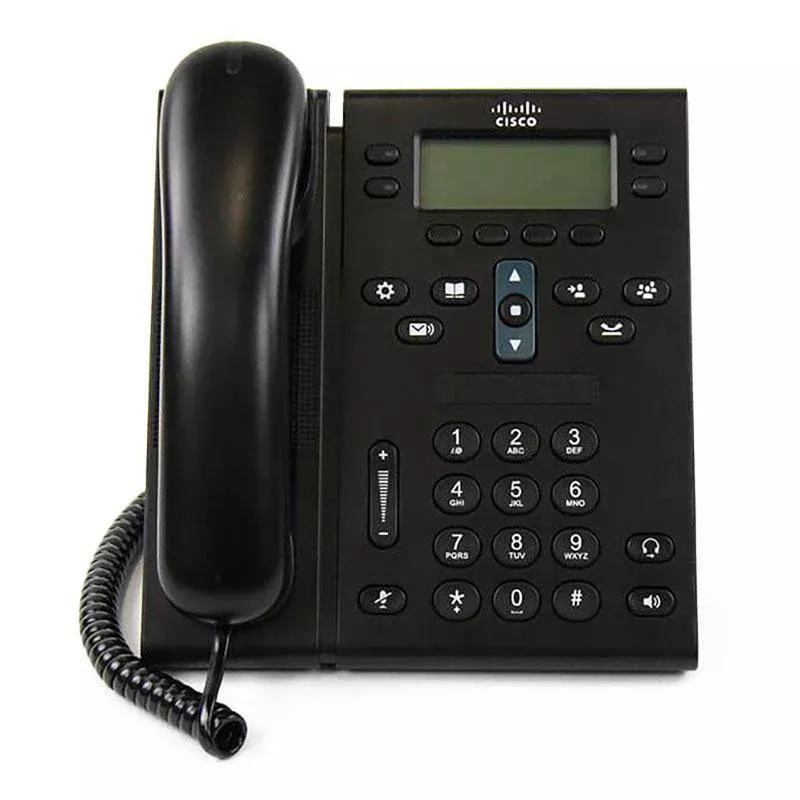
Cisco CP-6941-CK9 Price in Pakistan
Features
- Dual Protocol Support: Supports both SCCP and SIP protocols, preloaded with SCCP.
- Package Contents: Includes the 6941 IP Phone, desk stand, handset with cord, and network cable.
- Power Options: Supports 802.3af Power-over-Ethernet (PoE) or optional power adapter.
- Display: Features a 396 x 162 pixel-based, anti-glare, monochrome display with white backlight.
- Call Features: Offers four voice lines, fixed feature buttons, programmable softkeys, and a high-quality, 2-way speakerphone.
- Connectivity and Security: Includes dual Ethernet (10/100) line interface, headset port, support for Cisco Discovery Protocol, IEEE 802.1 p/q tagging, and various security features.
Description
Cisco CP-6941-CK9 IP Phone Price in Pakistan – Reliable Enterprise VoIP Phone for Professional Communication
Looking for the latest Cisco CP-6941-CK9 IP Phone price in Pakistan for your office communication setup? The Cisco CP-6941-CK9 IP Phone is a business-class voice IP phone designed for organizations that require dependable communication, professional voice quality, and efficient multi-line management. Built with enterprise communication needs in mind, this Cisco IP Phone helps businesses improve productivity while keeping communication simple and reliable.
If you want to Buy Cisco CP-6941-CK9 IP Phone, this model is ideal for reception desks, customer support departments, office administrators, and growing businesses looking to move from traditional desk telephones to modern IP phone systems. The phone supports 4 voice lines, full-duplex speakerphone functionality, dual Ethernet ports, and Power over Ethernet (PoE) for easy deployment.
Explore communication solutions:
External brand resource:
Why Buy Cisco CP-6941-CK9 IP Phone for Business Communication?
Modern organizations need more than ordinary phone systems. Businesses require flexible communication tools that support daily operations and future growth.
The Cisco CP-6941-CK9 provides:
✓ Supports up to 4 voice lines
✓ Full duplex speakerphone
✓ Wideband HD audio support
✓ Integrated dual Ethernet switch
✓ PoE support
✓ Programmable soft keys
✓ Headset compatibility
✓ SIP and SCCP protocol support
✓ Enterprise security functionality
✓ Professional communication performance
Need a Professional Voice Over IP Phone for Office Teams?
The Cisco CP-6941-CK9 IP Phone includes communication features designed for smooth office operations.
Business communication functions include:
- Call transfer
- Call forwarding
- Conference calling
- Speed dialing
- Call waiting
- Contact management
- Speakerphone support
- Multi-line call handling
- Secure communication features
- SIP integration
Businesses using voice over IP phone systems often improve workflow efficiency and reduce communication expenses.
How Does Cisco CP-6941-CK9 Improve Productivity?
HD Audio and Smart Call Management
Communication quality plays an important role in customer service and internal collaboration.
The device includes:
- Wideband audio technology
- Full-duplex speakerphone
- Dedicated function keys
- Simplified navigation controls
- Enhanced voice clarity
- Stable communication performance
Cisco designed the 6941 series to provide affordable business communication while supporting professional office environments.
Why Choose Cisco CP-6941-CK9 IP Phone?
Businesses often compare devices while searching for the best IP phone solution.
Business Benefits
✓ Lower communication costs
✓ Easy deployment process
✓ Professional voice quality
✓ Reliable daily performance
✓ Secure business communication
✓ Enterprise scalability
✓ Flexible installation options
✓ Long-term business value
Looking for Integration with IP Phone Systems?
The Cisco CP-6941-CK9 integrates with:
- IP PBX systems
- Hosted VoIP services
- SIP communication platforms
- Enterprise communication systems
- Office collaboration environments
- Unified communication solutions
- Business communication networks
- Corporate office infrastructure
Community discussions indicate that some Cisco 6941 phones may require SIP firmware rather than SCCP firmware for standalone or third-party VoIP deployments.
Common Business Applications of Cisco CP-6941-CK9 IP Phone
The Cisco CP-6941-CK9 is commonly used for:
- Corporate offices
- Reception desks
- Customer service departments
- Administrative offices
- Healthcare facilities
- Educational institutions
- Enterprise environments
- Call centers
Frequently Asked Questions
What is Cisco CP-6941-CK9 IP Phone used for?
It is used for professional VoIP communication, office call management, and enterprise business communication systems.
How many lines does Cisco CP-6941-CK9 support?
The phone supports up to 4 voice lines.
Does Cisco CP-6941-CK9 support PoE?
Yes, it supports IEEE 802.3af Power over Ethernet for simpler installation.
Does Cisco CP-6941-CK9 support conference calling?
Yes, the phone supports conference features and speakerphone functionality.
Why should businesses Buy Cisco CP-6941-CK9 IP Phone?
Businesses choose it because of its multi-line support, professional audio quality, business reliability, and cost-effective deployment.
Buy Cisco CP-6941-CK9 IP Phone Price in Pakistan Today
If you are searching for Cisco IP Phone price in Pakistan, comparing best voice over IP phones, or upgrading your IP phone systems, the Cisco CP-6941-CK9 IP Phone delivers dependable communication features and professional business performance.
Reviews
There are no reviews yet.